🛠️ Manual Installation of Webroot Endpoint Agent
Steps Recorded By: Dylan Barrett
Date: July 8, 2025
📥 Performing a Manual Install of the Webroot Agent
- Log into the Webroot Console.
- Navigate to the Site for which you want to install an agent.
- Inside the Company Site, go to Endpoint Protection.
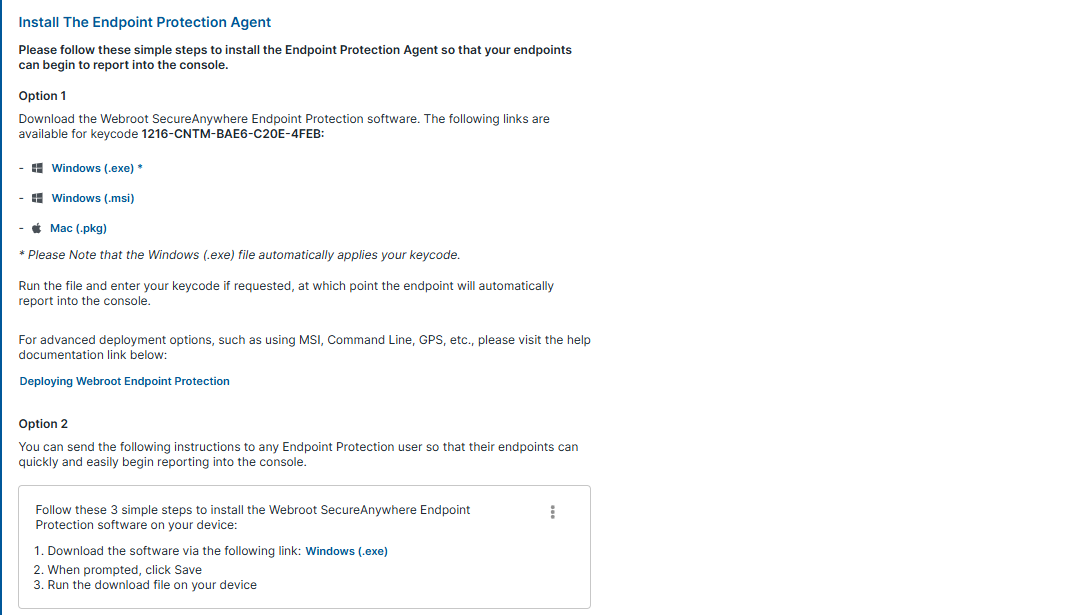
- You will see several installer options for that site:
- Windows
.exe .msifor scripting- Mac installer
- Windows
- If you download the Windows
.exe, the site token is automatically embedded. - If you use other installers (e.g.,
.msior Mac), you will need to manually enter the site token during installation. - Download or transfer the installer to the end user’s machine.
- Run the installer and follow the prompts to complete setup.
- After installation, verify the device appears in the Webroot console under that site’s endpoint list.