💾 Installing and Registering the Datto Endpoint Backup Agent
Steps Recorded By: Dylan Barrett
Date: July 7, 2025
🔗 Official Install Guide (Datto)
🧭 Installation & Registration Steps (Interactive)
-
Go to Datto Downloads Page
-
Download the Endpoint Backup for PC's
-
Run installer on the computer you are trying to add to your portal
-
Once the installer finishes you will be promtped to Log into the Datto Partner Portal
-
it will auto navigate to:
Status → Endpoint Backup Status → Register Agent(top-right of the page). -
In the Register Datto Endpoint Backup Agent window:
- Select or create the appropriate Organization.
- Enter the Agent ID.
- Choose a Datacenter – this determines where cloud backups are stored.
Available Datacenter options:- 🇺🇸 United States
- 🇨🇦 Canada
- 🇦🇺 Australia
- 🇩🇪 Germany
- 🇬🇧 United Kingdom
- Select the desired Subscription Type.
-
Once all fields are completed, click Register.
-
Finally, Confirm that the process worked and you can see the new agent in the Datto portal
-
Leave the Endpoint on untill it finishes it first backup
Installation & Registration Steps (Non-Interactive)
Followed the information from datto on this KB Article
-
Go to Datto Downloads Page
-
Download the Endpoint Backup for PC's the MSI installer
- The Link for the MSI installer was located in the KB article above
-
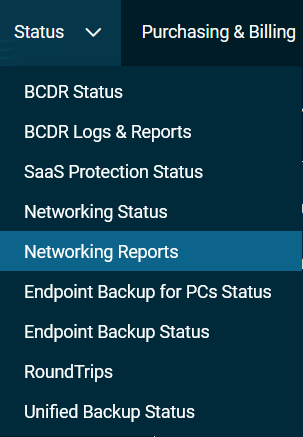
In the Partner Center go to "Status" in the Top Navigation Pane

-
In the Drop Down Select "Endpoint Backup for PC's Status"
-
Select the Company that you would like to install the agent for
-
Click on Create RMM Templete

-
This will generate a Token for you to use in the Silent Install
-
Transfer the MSI file to the endpoint you would like to install on in this example I have sent to C:\Temp
-
Change Directory to C:|Temp
cd C:\Temp
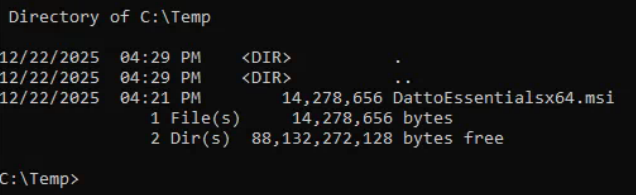
- Run the Command and replace with the token created from your RMM template
msiexec /i DattoEssentialsx64.msi /qn /norestart REGTOKEN="<token>"
- Ensure Visability in the Datto Partner Portal